Showing posts with label free software. Show all posts

Uninstall AVG Antivirus with AVG 2013 Removal Tool

AVG Anti virus

Avg antivirus is one of the most popular antivirus that used by user. There is a two kind version of this antivirus, Free AVG antivirus and AVG Antivirus Pro. May be you’re one of many user who used this antivirus on your computer. But if you want to replace it with another one, you must first uninstall AVG antivirus.

To uninstaall AVG Antivirus can be do it from Control Panel, that’s traditional uninstall method. Another way to remove AVG antivirus is with AVG Remover 2013. AVG Remover 2013 is made by AVG. With AVG Remover 2013, you can remove AVG antivirus completely. This tool removes following related to AVG Registry entries, user files and installation files and AVG user settings and files in Virus Vault.

How to use AVG Remover
  • Download AVG remover and run it.
  • Accept to AVG license agreement and AVG Fair Processing notice
  • To the warning dialog shown on screen click “yes, Remove AVG”
  • The tool starts to remove the entries which you can see in command prompt window and your Computer will be restarted automatically.
  • After restart your screen goes blank for a while where AVG Remover removes remaining files on startup.

Download CCleaner 3.20 final

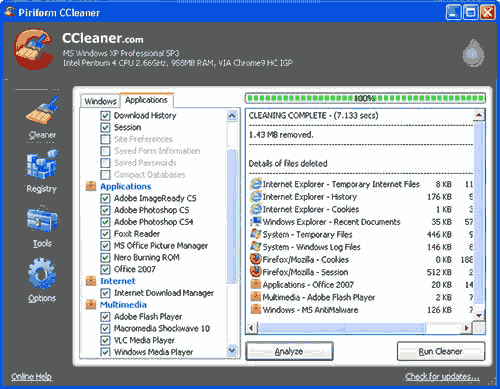
After released CCleaner 3.19, now piriform has release update of CCleaner to Ccleaner 3.20. As we know that CCleaner is the best free system optimization and cleaning tool. If you use this tool, we recommended to update your CCleaner now to the latest version.

CCleaner latest version

CCleaner can cleans this following stuff :
  • Internet Explorer - Temporary files, history, cookies, Autocomplete form history, index.dat.
  • Firefox - Temporary files, history, cookies, download history, form history.
  • Google Chrome - Temporary files, history, cookies, download history, form history.
  • Opera - Temporary files, history, cookies.
  • Safari - Temporary files, history, cookies, form history.
  • Windows - Recycle Bin, Recent Documents, Temporary files and Log files.
  • Registry Cleaner - Advanced features to remove unused and old registry entries.

Download Mozilla firefox 11.0 Beta

Mozilla firefox 11

Are you firefox browser lover ? Now Mozilla firefox has released Firefox 11.0 Beta. You can get it in all computer OS, Firefox 11.0 for Windows, Firefox 11.0 for Mac and Firefox 11.0 for Linux. To the point, you can get it with following link bellow


Download VLC Player 2.0 Final for Windows, Mac, Linux

VLC Player 2.0 Final

VLC Media Player is one of most popular media player software for free to use by users. Now, VideoLAN has just released the next major version VLC Media Player, VLC 2.0, for Windows, Mac and Linux.

Bellow is features of the VLC Player 2.0

Video
  • Rewritten video output core and modules, allowing subpicture blending in GPU.
  • Shader support in the OpenGL output, for colorspace conversion, including 10bits.
  • New video outputs for Windows 7, Android, iOS and OS/2.
  • New debanding, grain, denoising and anti-flickering filters.
  • New deinterlacing filter, including an Inverse Telecine algorithm.

Audio
  • New resamplers for higher quality audio.
  • New dynamic range compressor and karaoke filters.
  • Simplification of the audio core for faster processing.
  • New audio outputs for iOS, Android and OS/2.

Formats
  • Multi-threaded decoding for H.264, MPEG-4/Xvid and WebM.
  • Support for 10bits codecs, WMV image and some other codecs.
  • Rewritten support for images, including jpeg, png, xcf, bmp...
  • Important changes in RealVideo and Real Format support.
  • CrystalHD cards and Android OpenMAX support for hardware decoding.

Input and Devices
  • Experimental support for BluRay discs:
    - Menus are deactivated in this release (will come soon).
    - AACS and BD+ DRM libraries and keys are not shipped, for legal reasons.
  • Support for SDI capture cards and QTKit devices.
  • Support for new adaptive streaming protocols, like HLS and DASH.

For Mac Users
  • Completely new, single window interface:
    - Available in 2 colors: Lion grey and QTX black.
    - Extensions support and better Lion integration.
  • Support for all QTKit devices through qtcapture and qtsound modules.
  • Continued support for X 10.5 and PPC users (1080p and ProRes on Dual-G5!).

For Anime Fans
  • Vastly improved MKV demuxer.
  • Rewritten linked segments and ordered chapter files support.
  • Correct support for FLAC, RV and Hi10p in MKV.
  • Rewritten seeking support in cue files.
  • Various ASS subtitles improvements.

For professional Users
  • Support for ProRes 422 and 4444, AVC/Intra.
  • Support for Jpeg-2000 and DNxHD/VC-3 in 10bits.
  • Support for EBU subtitles (stl) and EIA-608.
  • SDI and HD-SDI card support for input on Linux.
  • New Dirac/VC-2 encoder, faster than the previous one.

For Developers
  • libVLC, libVLCcore and libcompat have switched from GPL to LGPLv2.1+.
  • New libVLC examples are available: media player, photobooth and mediainfo clones.
  • New JSON requests on the web interface to control running VLC instances.
  • Implementation of the MPRIS2 interface to control media players.
  • VLC's web plugins have been rewritten for better integration and stability in all browsers

If you’re VLC Player user lovers, you can get it with following link :


Download CCleaner 3.13

CCleaner is is one of most software that must you have to increase performance your computer. CCleaner will remove the junk files, temporary files, history your browsing internet, cookies, recent documents, empty recycle bin, clipboard, memory dumps, windows log files, chkdsk file fragments. Thus your computer will be increase free space of harddisk drive and then your computer will running faster.

ccleaner
Besides of feature above, CCleaner also have a registry cleaner and tools like uninstall program, setting start up, system restore and drive wiper. With this software, user can do easily to maintenance computer.

The latest CCleaner 3.13 ships with these new/improved features:
  • Added IE addon manager.
  • Added Firefox Jumplist Cache cleaning.
  • Improved Firefox and Thunderbird cache cleaning.
  • Improved Google Chrome Internet History cleaning for typed URLs.
  • Improved Google Chrome Canary Saved Form Information cleaning.
  • Improved Google Chrome Canary Saved Passwords cleaning.
  • Improved Recycle Bin cleaning with symbolic links.
  • Improved item exclusion feedback in Registry screen.
  • Improved keyboard usability on Intelligent Cookie scan dialog.
  • Added support for custom Thunderbird installation.
  • e.g. CustomLocation1=THUNDERBIRD|C:\Portable\Thunderbird\Data\profile
  • Added cleaning for Corel PaintShop Pro X4, Nero Video 11 and Nero Vision 10.
  • Improved cleaning for WinRAR, LogMeIn, Office 2003, 2007 and 2010.
  • Added Indonesian translation.
If you want to trying or use this product, you can download it at this link bellow :

Freedownload TweakNow Power Pack 2011

TweakNow PowerPack is a free software that used to tweak computer’s operating system and web browser. Although a free but this software is powerfull to fine tune your computer. There are many usefull utilities to optimizer your computer. Available many features in this program, The Registry Cleaner module provides you with a safe and simple way to clean Windows Registry, For Windows tweaking lovers, the suite provides more than 100 hidden Windows settings in the Windows Secret section, customize your windows, troubleshooting, view detail information about computer (operating system, memory, harddisk, processor, motherboard, etc) and many more. With this software, you can easily make computer  to run faster and customize configuration your desktop. TweakNow PowerPack is compatible with Windows XP/Vista/Windows7.

freedownload software tweak windows

If you want to get this software, you can download at this link below.

Freedownload PhotoshopCS5 Portable

Photoshop CS5 portable is a stand-alone application that is widely used today. Because it is portable, then Photoshop CS5 is no need to be installed on your computer. Simply double click on the icon photoshopcs5portable, then photoshopcs5 applications will run on your computer.
If you need this portable application can be downloaded photoshopcs5 on the link below. Inside the zip file, the file size is 66 MB and after extract the file size is 321 MB.

Show Desktop

Show Desktop

Version 1.042

Requires .NET Framework 3.5

Compatible with Windows XP, Windows Vista, and Windows 7


Description

'Show Desktop' is a small standalone application that creates a small rectangular button at the right side of the user's task bar, next to the clock, which, when clicked, allows the user to minimize all open windows or temporarily make them transparent so the user can "peek" at the desktop.

'Show Desktop' also allows the user to change the application's settings to their liking, so they can make the button smaller or even invisible, or so they can change how windows are minimized.

'Show Desktop' even gives the user to easily shutdown, restart, standby, hibernate... their computer straight from the right click menu accessible from the button itself.

Added Features

- Aero Peek
- Exclusion List (NEW)
- A new, more user friendly, settings window.
- Ability to shutdown, restart... computer
- The rightclick menu is accessible right from the button
- Tool-tip that looks like the one in Windows 7
- Option to change the button's transparency
- Option to change Aero Peek transparency
- Option to enable/disable Aero Peek
- Multi-monitor support.

Fixed

- Button now works with hidden taskbar.
- Button now stays with the taskbar when the screen resolution is changed.
- Bug fixed where the button goes behind the taskbar.
- Windows moving to the left after Aero Peeking.
- Button staying above fullscreen windows.


Show Desktop XP is exclusive to Aero Xtreme 7 XP . You may NOT package it with a theme or any other work without the permission of me and =InTime69. If you want to feature it, just simply post a link to this page.

Credits

Aero images captured by =InTime69

Testing done by ~ptukey, =InTime69, =PeterRollar, ~s0be1t, and ~Sytheii

Download DESKTOP.1.042

 
Powered by Blogger | Printable Coupons