Showing posts with label freedownload. Show all posts

Freedownload CCleaner 4.01 Latest Version

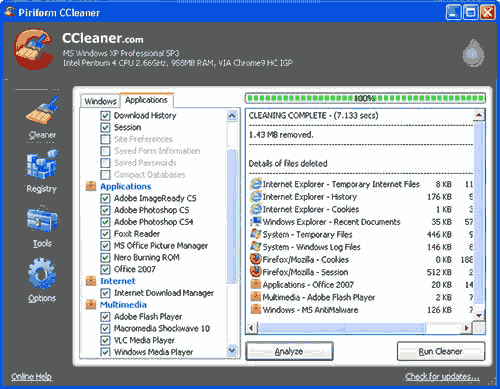
CCleaner has updated to CCleaner 4.01 which comes with improvements browser support. If you are CCleaner lover, this is a good news for you. As we knowed that CCleaner is a free system optimization and cleaning tool. CCleaner can help your computer run faster by freeing uap harddisk space.

CCleaner latest version

Features :
  • Added cleaning for Adobe Acrobat XI, VSO Blu-ray and DVD Converter Ultimate, Oxygen XML Editor 14 and Connectify Hotspot
  • Improved cleaning for Google Earth and MailWasher Pro
  • Improved compatibility with Firefox v19 and newer
  • Improved Duplicate File Finder tool
  • Improved History cleaning for Google Chrome
  • Improved Internet Explorer 10 compatibility
  • Minor bug fixes
  • Minor GUI improvements
  • Optimized Registry cleaning algorithm for Windows 8
  • Optimized System and Browser Monitoring (Pro Version)

Freedownload Advanced SystemCare 4.Pro

Advanced SystemCare is PC maintenance tool from Iobit. It’s full utilities to fix problems, improve performance. This program make user to easily maintenance their computer with one click. The program is split into four core sections: Quick Care performs a quick-fire scan of five key areas of your computer: malware, Registry, shortcuts, privacy sweeper and junk files. If you want to go further, select Deep Care instead – this performs the same five scans as Quick Care, albeit going deeper (so you get a full malware scan and deep Registry clean), plus adds another five for good measure.

This free version contains all the basic functionality you need – if you want to push things even further, try the paid-for Pro version instead which includes deeper scanning, automatic optimisation and access to 10 different user interface themes.. Once you’ve upgraded, just enter the license key to unlock the program’s full range of features. You can download free version of Advanced SystemCare by click this download link 

AdvancedSystemCare 4 Pro
For Advanced SystemCare 4 Pro you must buy this license about $19.95. But you can get and Download Advanced SystemCare 4 Pro for free by visit this page http://www.downloadcrew.co.uk/article/21777-iobit_advanced_systemcare_4 Just Download this software and then use serial code to turn Advanced SystemCare 4 in to the PRO version. Hurry up ..!!. This full version download offer is available through to December 31 2011.
Special thanks to DownloadCrew for shared Advanced SystemCare 4 Pro

Freedownload TweakNow Power Pack 2011

TweakNow PowerPack is a free software that used to tweak computer’s operating system and web browser. Although a free but this software is powerfull to fine tune your computer. There are many usefull utilities to optimizer your computer. Available many features in this program, The Registry Cleaner module provides you with a safe and simple way to clean Windows Registry, For Windows tweaking lovers, the suite provides more than 100 hidden Windows settings in the Windows Secret section, customize your windows, troubleshooting, view detail information about computer (operating system, memory, harddisk, processor, motherboard, etc) and many more. With this software, you can easily make computer  to run faster and customize configuration your desktop. TweakNow PowerPack is compatible with Windows XP/Vista/Windows7.

freedownload software tweak windows

If you want to get this software, you can download at this link below.

Download TuneUp Utilities 2011 Build 10


TuneUp Utilities is tools that can make your Windows operating system faster, more comfortable and more secure with just a few mouse clicks. And so, all operations performed on the operating system are completely safe, because all changes are monitored by TuneUp Rescue Center and can be undone at any time.

This software helps users to make Windows meet their needs in a way that is better, easier and safer. All important system options are explained in an easy way and can be turned on or off by click of your mouse. TuneUp Utilities will then make the necessary changes in the registry or boot files automatically. We place a high value on system stability, so that Windows won’t stop working reliably. Then more changes that you make can be undone in TuneUp Rescue Center with easily and safely.

TuneUp Utilities automatically runs important maintenance tasks, makes you aware of any problems and offers simple solutions. This ensures performance is always at its best. You can also use TuneUp Utilities to customize the appearance of your Windows system to make working on your computer more enjoyable.

If you want to use this software, can be downloaded at link below :

Download

Freedownload PhotoshopCS5 Portable

Photoshop CS5 portable is a stand-alone application that is widely used today. Because it is portable, then Photoshop CS5 is no need to be installed on your computer. Simply double click on the icon photoshopcs5portable, then photoshopcs5 applications will run on your computer.
If you need this portable application can be downloaded photoshopcs5 on the link below. Inside the zip file, the file size is 66 MB and after extract the file size is 321 MB.

Show Desktop

Show Desktop

Version 1.042

Requires .NET Framework 3.5

Compatible with Windows XP, Windows Vista, and Windows 7


Description

'Show Desktop' is a small standalone application that creates a small rectangular button at the right side of the user's task bar, next to the clock, which, when clicked, allows the user to minimize all open windows or temporarily make them transparent so the user can "peek" at the desktop.

'Show Desktop' also allows the user to change the application's settings to their liking, so they can make the button smaller or even invisible, or so they can change how windows are minimized.

'Show Desktop' even gives the user to easily shutdown, restart, standby, hibernate... their computer straight from the right click menu accessible from the button itself.

Added Features

- Aero Peek
- Exclusion List (NEW)
- A new, more user friendly, settings window.
- Ability to shutdown, restart... computer
- The rightclick menu is accessible right from the button
- Tool-tip that looks like the one in Windows 7
- Option to change the button's transparency
- Option to change Aero Peek transparency
- Option to enable/disable Aero Peek
- Multi-monitor support.

Fixed

- Button now works with hidden taskbar.
- Button now stays with the taskbar when the screen resolution is changed.
- Bug fixed where the button goes behind the taskbar.
- Windows moving to the left after Aero Peeking.
- Button staying above fullscreen windows.


Show Desktop XP is exclusive to Aero Xtreme 7 XP . You may NOT package it with a theme or any other work without the permission of me and =InTime69. If you want to feature it, just simply post a link to this page.

Credits

Aero images captured by =InTime69

Testing done by ~ptukey, =InTime69, =PeterRollar, ~s0be1t, and ~Sytheii

Download DESKTOP.1.042

 
Powered by Blogger | Printable Coupons