Showing posts with label internet. Show all posts

iDriveSync Free File Online Storage 10 GB for Limited Sign Up

Many free file online storage has released to public. For Limited Sign Up, iDriveSync give you free 10 GB that can be share file across computer easily. So you have open your file at anywhere with iDriveSync.

To Sign Up for iDriveSync if available, you can visit homepage iDriveSync here

You can use iDriveSync for PC and installed on your computer and get your iDriveSync folder (Documents, Music, Videos, hotos) to share your files.

iDriveSync Free File Online Storage

To open your folder you must login in to iDriveSync for PC and you can access the folder from iDriveSync button in Notification Area or windows explorer.

access iDriveSync folder

Outlook.com | A New Free Web Mail Service From Microsoft

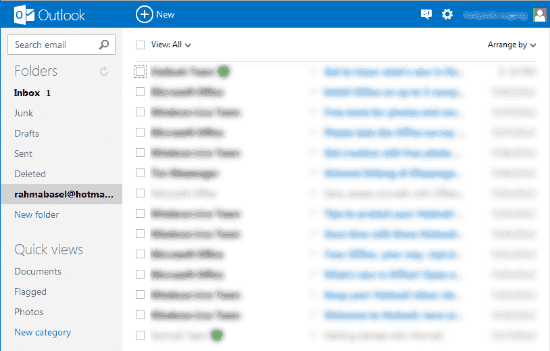
Microsoft has launched the new free web mail service and available for everyone. The name of web mail service is Outlook.com. Outlook.com comes with new user interface, robust account security, industry leading spam protection, minimal advertisements, Office Web apps, ability to connect to Facebook and Twitter, and more. Email address with outlook.com is Your account@Outlook.com. For Hotmail, MSN, and Live users can rename your account to Outlook.com by keeping email address, password, contacts, and old emails safely

outlook.com | free web mail service

If you don’t have outlook.com account, you can sign up to get an @Outlook.com email address by visiting http://www.outlook.com/

To rename your MSN, hotmail, live accounts, visit link bellow to get the tutorials.

Download Opera 12

Good news for Opera lovers, now Opera finally has released Update version. It is Opera 12 for Windows, Mac, and Linux.

Opera 12

Features of Opera 12
  • HTML5 drag-and-drop
  • Easier to personalize
  • Support 64-bit
  • Hardware acceleration
  • Access your camera
  • Support for the Do Not Track header
  • CSS3 Animations and Transitions
  • Support for CORS – Cross-Origin Resource Sharing
  • Right-to-Left (RTL) Script Support Added
  • Improved language support (Persian, Urdu, Hebrew, and Arabic)
  • Window and Tabs API.

Download Mozilla FireFox 13 Final

If you are using Firefox to surfing in the internet, may be you must check your firefox version browser. Because now Firefox has released update version to Mozilla FireFox 13 for Windows, Mac, and Linux OS.

Mozilla Firefox latest version

To update the mozilla firefox, you can check update for firefox. Click help tab in your firefox browser and select about Firefox, then click on Check Update button. Other way to update Firefox is by downloading the installer.

You can download the latest version of Mozilla Firefox using following link


Download Opera 11.64

Now, Opera has released new version of Opera Browser is Opera 11.64. So for Opera users, you can upgrade your opera version to opera 11.64.

download opera

Feature :
  • Improved Opera skin installation
  • Improved plug-in install wizard
  • New Add to Panel dialog to replace the old Bookmarks dialog
  • Mail grouping: Opera will automatically group messages by date. You can also group them by unread status, by pinned status, or not at all.
  • Cleaned up look: The mail toolbars are simplified, and icons have been redesigned.
  • New settings dialogs: The "View" dropdown menu with all its sub-menus has been replaced by an overlay dialog that can be reached by clicking the "wrench" button.
  • Pinning: You can now "pin" messages with one click in the message list or in the message headers, to mark a message for attention.

Google Drive Free file storage service online from google

As we know that many file sharing storage online sites, like 4shared, ziddu, mediafire, and many more. Now one more of file storage online has launched. It is Google Drive by google. Its a free service which can be used to create, share, collaborate, and keep all of your stuff online. You can upload and access all of your files, including videos, photos, Google Docs, PDFs and much more using Google Drive.

google drive

Refer to the Introducing Google Drive, with Google Drive, you can:
  • Create and collaborate: Google Docs is built right into Google Drive, so you can work with others in real time on documents, spreadsheets and presentations. Once you choose to share content with others, you can add and reply to comments on anything (PDF, image, video file, etc.) and receive notifications when other people comment on shared items.
  • Store everything safely and access it anywhere (especially while on the go):You can access your stuff from anywhere - on the web, in your home, at the office, while running errands and from all of your devices. You can install Google Drive on your Mac or PC and can download the Google Drive app to your Android phone or tablet. Google is also working hard on a Google Drive app for iOS devices. And regardless of platform, blind users can access Google Drive with a screen reader.
  • Search everything: Search by keyword and filter by file type, owner and more. Google Drive can even recognize text in scanned documents using Optical Character Recognition (OCR) technology. Let's say you upload a scanned image of an old newspaper clipping. You can search for a word from the text of the actual article. Google Drive also uses image recognition so that if you drag and drop photos from your Grand Canyon trip into Google Drive, you can later search for [grand canyon] and photos of its gorges should pop up.
You can get started with 5GB of storage for free—that’s enough to store the high-res photos of your trip to the Mt. Everest, scanned copies of your grandparents’ love letters or a career’s worth of business proposals, and still have space for the novel you’re working on. You can choose to upgrade to 25GB for $2.49/month, 100GB for $4.99/month or even 1TB for $49.99/month. When you upgrade to a paid account, your Gmail account storage will also expand to 25GB.

Drive is built to work seamlessly with your overall Google experience. You can attach photos from Drive to posts in Google+, and soon you’ll be able to attach stuff from Drive directly to emails in Gmail. Drive is also an open platform, so we’re working with many third-party developers so you can do things like send faxes, edit videos and create website mockups directly from Drive. To install these apps, visit the Chrome Web Store—and look out for even more useful apps in the future.


Convert text image to text

Did you have a text on the paper, like a book, biography, story life or text about science, tutorial, etc, and you want to write again on the computer ?, so you can use the online convert image to text if you don’t have an OCR scanner. With this way you don't need write manually again. The first step is scan your letter with scanner, and it result is image with jpg, png, etc units. Save your image to the folder in hard drive.

Next step is visit this address onlineocr
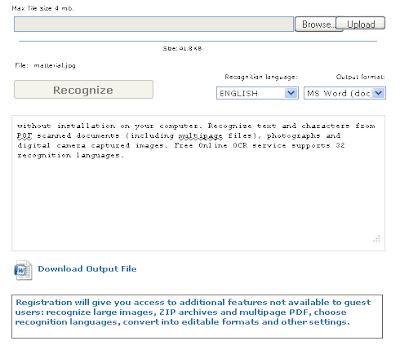
Browse your image file and then upload it (max file size is 4 mb)
online ocr
If this done, choose Recognition language and output format options. So fill enter code that shown and then click Recognize.

convert jpg to text
Now you can download out put file and then you can edit the text.

 
Powered by Blogger | Printable Coupons