Saturday, December 17, 2011
 pc-seven
Some times when you get a job to make artistic teks, you can make it with artistic teks program like Ms Word, Adobe Photoshop, Corel Draw, etc. At doing this job we need some artistic fonts that installed at the computer. This artistic fonts can make your job safely a time. When you installing windows 7, the standart font will be automatic installed to the computer. But another artistic font not yet installed. You may install new font by your self.
Trick to install font to the computer in Windows 7 can be follow this steps :
Trick to install font to the computer in Windows 7 can be follow this steps :
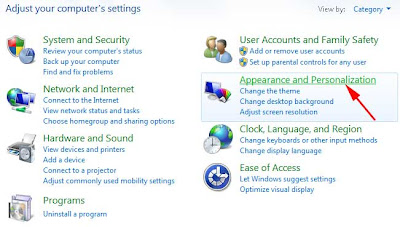
- Open Control Panel > Appearance and Personalization, > Fonts.
- Click File, and then click Install New Font.
If you don’t see the File menu, press ALT. - In the Add Fonts dialog box, under Drives, click the drive where the font that you want to install is located.
- Double-click the folder containing the fonts that you want to add.
- Under List of fonts, click the font that you want to add, and then click Install.