Showing posts with label windows 8. Show all posts

Download windows 8 Themes for free

Happy new year for the PC-seven readers, wish you all the best in this year and success for everyday.
For you who use windows 8 operating system, may be you want to change theme of your windows 8. With change of windows 8 theme, user can be refresh the computer’s display.


To change theme of windows 8, first you must have themes for windows 8. To get windows 8 themes, you can download it for free. Follow link bellow to download windows 8 themes for free.

How To Disable The Lock Screen In Windows 8

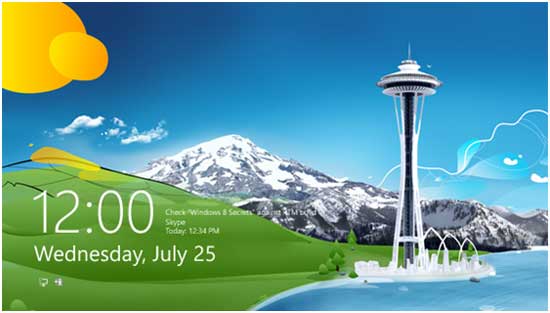
Lock screen windows 8

If you want to disable the lock screen in windows 8 in order to have faster access to the logon screen, you can do it with this tutorial.
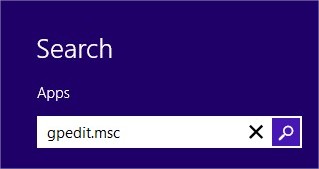
  1. Click on Search at the bottom-right corner of the screen. And then type gpedit.msc and hit enter.

    Search Field

  2. Navigate to Computer Configuration\Administrative Templates\Control Panel\Personalization.
    Personalization windows 8

  3. Double click the Do not display the lock screen option, change it to Enabled and click on Apply and OK

    Enabled

  4. Restart your computer

How to get Windows 8 for Dummies Free E-Book

Every one know about new OS from Microsoft, that is Windows 8. Windows 8 Pro has released on October 2012 in few days ago. Windows 8 comes with new many features that you don't want to missed. As guide to starting in windows 8, Dell offering free e-book,Windows 8 for Dummies available for download in PDF format which you can download for free.

Windows 8 for Dummies free e-book

Visit this address (https://marketing.dell.com/windows-8-ebook) and fill the form to download e-book. You need to provide your name, company name, email address, phone number and other details and then click Submit

Table of Contents
  • The New Start screen
  • The Traditional desktop
  • Storage: Internal, External, and in the Sky
  • Working with Apps
  • Engaging the Social Apps
  • Getting Connected and Having fun through the Start Screen
  • Ten things you’ll Hate about Windows 8 (And how to fix them)

Log in directly into Windows without entering password

Usually when start your windows (xp, windows 7 or windows 8), you will be enter your user name and the password to be able login in to windows. This is very usefull to protect your PC from another user from unauthorized access and other users should be do it too. Your personal data will be safe from another person. But if you are the one person who use the computer, you may can using this trick to pass the login in to windows without entering the password.

This is the trick to be able to log in to Windows without entering any user name or password.
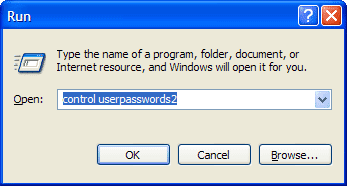
  1. Press Win + R to open Run and then type control userpasswords2 and press enter

    control userpasswords2

  2. Uncheck Users must enter a user name and password to use this computer and click OK.

    Users must enter a user name and password to use this computer

  3. Restart the computer, and you will not be asked to enter your username and password

Download Windows 8 Release Preview

Windows 8 Release Preview

After releasing Windows 8 Developer Preview and Windows 8 Consumer Preview, Now Microsoft has finally released Windows 8 Release Preview to public which can be downloaded and tested absolutely free as usual.

If You want to try and use windows 8 Release Preview on your computer, you can download it by using following links


Windows 8 Release Preview is available in Arabic, English, Chinese (Simplified), Chinese (Traditional), French, German, Japanese, Korean, Portuguese (Brazil), Russian, Spanish, Swedish, and Turkish languages. And available for Both 32-bit (x86) and 64-bit (x64) versions

Use this product key provided by Microsoft if the setup asks for a product key at installation time.

TK8TP-9JN6P-7X7WW-RFFTV-B7QPF

Windows 8 Editions

Microsoft has announced the different versions of Windows 8 that will be available for "Windows 8" when it is released to market. Windows 8 has the flexibility you need - whether you’re on an x86/64 or a WOA PC. You can use a touch screen or a keyboard and mouse – and switch anytime. It’s beautiful, fast, and fluid design is perfect for a wide range of hardware. And you’ll love browsing through the Windows Store and downloading all the apps you want. And those apps can work together too so you can share photos, maps, contacts, links and whatever else you want faster and easier. 

And this is the Windows 8 Editions :
First, Windows 8 is the official product name for the next x86/64 editions of Windows. For many consumers, Windows 8 will be the right choice. It will include all the features above plus an updated Windows Explorer, Task Manager, better multi-monitor support and the ability to switch languages on the fly,which was previously only available in Enterprise/Ultimate editions of Windows. For China and a small set of select emerging markets, we will offer a local language-only edition of Windows 8. 

Windows 8 Pro is designed to help tech enthusiasts and business/technical professionals obtain a broader set of Windows 8 technologies. It includes all the features in Windows 8 plus features for encryption, virtualization, PC management and domain connectivity. Windows Media Center will be available as an economical “media pack” add-on to Windows 8 Pro. If you are an enthusiast or you want to use your PC in a business environment, you will want Windows 8 Pro. 

Windows RT is the newest member of the Windows family. This single edition will only be available pre-installed on PCs and tablets powered by ARM processors and will help enable new thin and lightweight form factors with impressive battery life. Windows RT will include touch-optimized desktop versions of the new Microsoft Word, Excel, PowerPoint, and OneNote. For new apps, the focus for Windows RT is development on the new Windows runtime, or WinRT, which we unveiled in September and forms the foundation of a new generation of cloud-enabled, touch-enabled, web-connected apps of all kinds.  

The features of each version of windows 8 :

Feature name
Windows 8
Windows 8 Pro
Windows RT
Upgrades from Windows 7 Starter, Home Basic, Home Premium
x
x

Upgrades from Windows 7 Professional, Ultimate

x

Start screen, Semantic Zoom, Live Tiles
x
x
x
Windows Store
x
x
x
Apps (Mail, Calendar, People, Messaging, Photos, SkyDrive, Reader, Music, Video)
x
x
x
Microsoft Office (Word, Excel, PowerPoint, OneNote)


x
Internet Explorer 10
x
x
x
Device encryption


x
Connected standby
x
x
x
Microsoft account
x
x
x
Desktop
x
x
x
Installation of x86/64 and desktop software
x
x

Updated Windows Explorer
x
x
x
Windows Defender
x
x
x
SmartScreen
x
x
x
Windows Update
x
x
x
Enhanced Task Manager
x
x
x
Switch languages on the fly (Language Packs)
x
x
x
Better multiple monitor support
x
x
x
Storage Spaces
x
x

Windows Media Player
x
x

Exchange ActiveSync
x
x
x
File history
x
x
x
ISO / VHD mount
x
x
x
Mobile broadband features
x
x
x
Picture password
x
x
x
Play To
x
x
x
Remote Desktop (client)
x
x
x
Reset and refresh your PC
x
x
x
Snap
x
x
x
Touch and Thumb keyboard
x
x
x
Trusted boot
x
x
x
VPN client
x
x
x
BitLocker and BitLocker To Go

x

Boot from VHD

x

Client Hyper-V

x

Domain Join

x

Encrypting File System

x

Group Policy

x

Remote Desktop (host)

x


Download Windows 8 Consumer Preview

Windows 8 Consumer Preview

Finally, it is a time that we waiting for. Microsoft has released Windows 8 Consumer Preview Beta version. Now you can download and try it for your computer. The downloads are available for 32 bit (2,5 GB ISO) and for 64 bit (3,3 GB ISO). Choose your language options.

Beside ISO Format, you can download for Windows 8 Consumer Preview Setup. Windows 8 Consumer Preview Setup will check to see if your PC can run Windows 8 Consumer Preview and select the right download. Setup also features a compatibility report and upgrade assistance. Built-in tools for creating an ISO or bootable flash drive are available for some previous versions of Windows (excluding Windows XP and earlier).

System Requirements, Windows 8 Consumer Preview works great on the same hardware that powers Windows 7:
  • Processor: 1 gigahertz (GHz) or faster
  • RAM: 1 gigabyte (GB) (32-bit) or 2 GB (64-bit)
  • Hard disk space: 16 GB (32-bit) or 20 GB (64-bit)
  • Graphics card: Microsoft DirectX 9 graphics device or higher
  • To use touch, you need a tablet or monitor that supports multitouch
  • To access Windows Store and to download and run apps, you need an active Internet connection and a screen resolution of at least 1024 x 768
  • To snap apps, you need a screen resolution of at least 1366 x 768
LINK DOWNLOAD Windows 8 Consumer Preview

 
Powered by Blogger | Printable Coupons