Get free Avira Antivirus Premium 2012 with activation code

Avira antivir premium 2012 free 

Avira Antivirus is one of more best antivirus. Avira antivirus available of free avira antivirus and avira antivirus premium. Avira antivirus premium provides better protection that the avira free. For get a avira antivirus premium 2012, you can buy that software at home page here

But now you can get Avira Antivirus Premium 2012 promo for free 6 months by following this steps :
  1. Open promo page of Avira Antivir Premium 2012 activation code here : Avira Antivir Premium 2012 promo page 
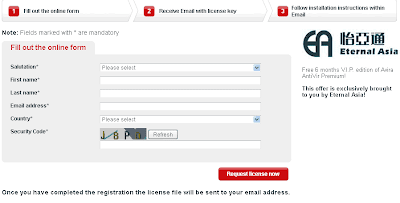
    Request Avira antivir premium 2012 free 
  2. You will receive email from Avira that contain confirmation link for the activation code and download link Avira Antivir Premium 2012
License code from this promo is not to for comercial uses. This license code is free for personal uses. You can download Avira Antivirus Premium 2012 here : http://www.avira.com/premium-download . This license code active for 6 mounth, and if promo ended you can buy Avira Antivir Premium 2012


Freedownload TweakNow Power Pack 2011

TweakNow PowerPack is a free software that used to tweak computer’s operating system and web browser. Although a free but this software is powerfull to fine tune your computer. There are many usefull utilities to optimizer your computer. Available many features in this program, The Registry Cleaner module provides you with a safe and simple way to clean Windows Registry, For Windows tweaking lovers, the suite provides more than 100 hidden Windows settings in the Windows Secret section, customize your windows, troubleshooting, view detail information about computer (operating system, memory, harddisk, processor, motherboard, etc) and many more. With this software, you can easily make computer  to run faster and customize configuration your desktop. TweakNow PowerPack is compatible with Windows XP/Vista/Windows7.

freedownload software tweak windows

If you want to get this software, you can download at this link below.

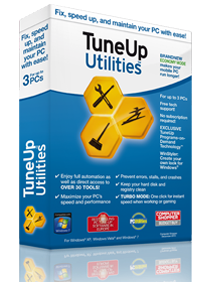
Download TuneUp Utilities 2012

TuneUp Utilities is a software that can improve the performance of your PC, pC become safer and more comfortable. The latest version of TuneUp Utilities is TuneUp Utilities 2012. There is the addition of new features that progran tuneup Deactivator and economic mode that can extend the duration of use of your laptop battery life. Features of TuneUp Utilities Start Center and Settings Center is the other new features

Some features of TuneUp Utilities 2012 is :
  1. Tune Up economy mode, TuneUp Economy Mode improves battery life by up to 30% and is nothing short of an energy-saving miracle.
  2. Tuneup program deactivator, Program Deactivator restores over 50% of speed and free space on bogged-down PCs
  3. Turbo Mode, Turbo Mode shuts down all non-essential Windows® services such as Media Player sharing, pen recognition, or remote assistance processes to give you the fastest PC performance possible.
  4. TuneUp Live Optimization, Live Optimization delivers on all counts with technology that works silently in the background and improves the prioritization process of all running applications. A nifty algorithm observes the computer’s total usage in real time, allowing it to balance resources more effectively. Programs start faster and application performance speeds increase – even if other processes are trying to slow your PC down.
  5. Disable startup programs, detects and helps you eliminate unwanted startup programs that use up resources and slow things down to a crawl.
  6. Accelerate system startup and shutdown, StartUp Optimizer jump starts your PC by identifying unnecessary startup programs and services, as well as incorrect system settings.
  7. Defragment hard disk, TuneUp Drive Defrag restores perfect order to your hard drive while speeding up file access, boot times, and program launches.
  8. Clean Windows® with a Single Click, TuneUp Utilities™ 2012’s maintenance feature eliminates system-hogging data clutter and prevents the typical “Windows slowdown” effect
  9. Clean hard disk, TuneUp Utilities™ deletes all kinds of junk data that is automatically left over by Windows.
  10. Uninstall unneeded programs, TuneUp Uninstall Manager helps identify those programs that are rarely used or never used at all. Such programs are removed quickly and easily, freeing up numerous gigabytes of disk space.
  11. Defragment, Clean and Edit the Registry, Over the course of a computer’s lifetime, hundreds of entries (“values” and “keys”) are written to the registry database only to be removed once again. That happens thousands of times daily and leads to values and keys referring to files, file types, applications, folders, or startup programs that  no longer  exist. The result: huge errors in Windows®, not to mention debilitating system crashes. TuneUp Registry Cleaner solves all these problems by detecting and fixing registry errors
  12. Find and Delete Large Amounts of Data, TuneUp Disk Space Explorer analyzes both internal and external hard drives and returns a graphical overview detailing what type of data is taking up the most disk space. It also identifies your PC’s top 10 resource hogs, and shows which of your folders contain the most data
  13. Remove Broken Shortcuts, TuneUp Shortcut Cleaner turns chaos into order by removing unnecessary shortcuts on your desktop, in your start menu, and in “recently used” lists like songs played in Media Player or documents in Microsoft Office that were deleted a long time ago
  14. Restore deleted files, TuneUp Undelete restores all your accidentally or mysteriously deleted files and folders, including those that were deleted from the Recycle Bin and even previously deleted images from your digital camera's memory card.
  15. You can easily browse all your deleted data or search for one specific file and rescue them from oblivion, assuming Windows® hasn’t overwritten the disk space that was previously occupied by them.
  16. Clean hard disk, All versions of Windows®, as well as several 3rd party programs, leave behind traces and temporary files which consume precious disk space and even contain personal information. With the “Unnecessary files”  feature of TuneUp Utilities™ 2012, you don’t just delete these reports, but  a ton of unnecessary data clutter as well
  17. Delete files safely, Simply deleting a file doesn’t necessarily mean it’s deleted. Even formatting a drive doesn’t actually destroy all those bits and bytes. In both cases, the file system simply deletes the internal “shortcuts” to such files and leaves the actual data on disk -  at least until it gets overwritten by new data. Which means anyone with basic recovery tools and access to your PC is able to restore such files.
  18. Analyze and troubleshoot your PC
  19. Personalize Windows
  20. And More Great Features
If you like to use this product, you can download at the link below

 
Powered by Blogger | Printable Coupons