How to get Windows 8 for Dummies Free E-Book

Every one know about new OS from Microsoft, that is Windows 8. Windows 8 Pro has released on October 2012 in few days ago. Windows 8 comes with new many features that you don't want to missed. As guide to starting in windows 8, Dell offering free e-book,Windows 8 for Dummies available for download in PDF format which you can download for free.

Windows 8 for Dummies free e-book

Visit this address (https://marketing.dell.com/windows-8-ebook) and fill the form to download e-book. You need to provide your name, company name, email address, phone number and other details and then click Submit

Table of Contents
  • The New Start screen
  • The Traditional desktop
  • Storage: Internal, External, and in the Sky
  • Working with Apps
  • Engaging the Social Apps
  • Getting Connected and Having fun through the Start Screen
  • Ten things you’ll Hate about Windows 8 (And how to fix them)
Log in directly into Windows without entering password

Usually when start your windows (xp, windows 7 or windows 8), you will be enter your user name and the password to be able login in to windows. This is very usefull to protect your PC from another user from unauthorized access and other users should be do it too. Your personal data will be safe from another person. But if you are the one person who use the computer, you may can using this trick to pass the login in to windows without entering the password.

This is the trick to be able to log in to Windows without entering any user name or password.
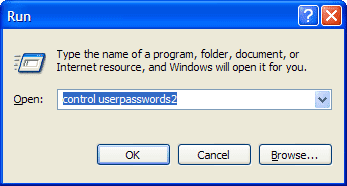
  1. Press Win + R to open Run and then type control userpasswords2 and press enter

    control userpasswords2

  2. Uncheck Users must enter a user name and password to use this computer and click OK.

    Users must enter a user name and password to use this computer

  3. Restart the computer, and you will not be asked to enter your username and password

Download CCleaner 3.24

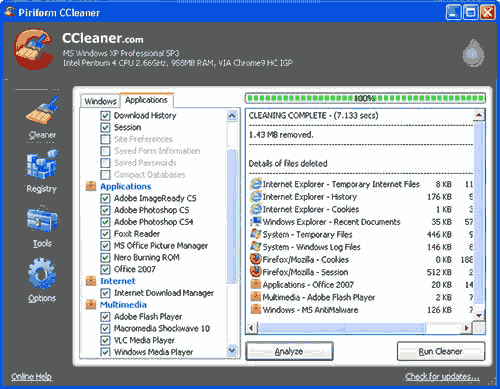
Many ways that we can do to optimization windows system. One of the ways is using Software such as CCleaner. CCleaner cleans of traces of the online activities and unused temporary files. Now CCleaner has updated to CCleaner 3.24.

CCleaner 3.24

New changes for CCleaner 3.24 are :
  • Optimized architecture for 64-bit builds of Windows 7 and 8.
  • Added Firefox Plugin and Extension management.
  • Added cleaning for AVG AntiVirus 2013, 4Sync, Copernic, DVDFab, Inkscape and PKZip.
  • Improved Firefox Aurora cookie cleaning.
  • Improved Chrome Canary Saved Form Information cleaning.
  • Improved cleaning for Windows MRUs.
  • Faster automatic updating for Pro version.
  • Minor GUI improvements.
  • Minor bug fixes.
If you want to use this software, you can download by using following link.

 
Powered by Blogger | Printable Coupons